


Write helpful Alt Text to describe images
Alternative (Alt) Text is a brief text description of images and graphics, and is an essential part of making content accessible. When adding images, icons or other graphic elements to digital content, be sure to add alt text so that your content will be accessible to all users.
Alt Text is read by screen readers (or other assistive tech) to provide information about the image to the reader. Alt text should not just describe the image, but provide context on how the image relates to the page content.
Alt Text Best Practices
- Keep it short, usually 1-2 sentences. Don’t overthink it.
- Consider key elements of why you chose this image, instead of describing every little detail.
- No need to say “image of” or “picture of.”
- But, do say if it’s a logo, illustration, painting, or cartoon.
- Don’t duplicate text that’s adjacent in the document or website.
- End the alt text sentence with a period.
Alt Text Examples
Browse examples of alt text for different types of images.
Photographs
For photographs consider the specifics included in the image, such as names, proper nouns, locations, or action words. Consider why you have chosen that particular image and what you hope it will convey to your audience.
Example 1

Alt Text: Group of young college students laugh and walk along a tree-lined pathway.
Example 2

Alt Text: Harvard’s Memorial Church with grand columns and hanging banners displaying Harvard shields.
Icons
For icons consider the purpose of the icon — whether it is to share a logo, to indicate an available action, or to serve as a link to a new page.
Example 1 - Logo

Alt Text: Harvard's Crimson Veritas Shield.
Example 2 - Action
For action icons, the alt text should describe the action intended by the icon, such as “Download Syllabus PDF” or "Search."

Alt Text: Print the Weekend Event Schedule.
Example 3 - Link
If the icon is being used as a link to another page, the alt text should describe what will happen when the icon is clicked.

Alt Text: Visit the Harvard Library Instagram.
Illustrations
For creative illustrations, the intent of the image matters more than the specific details. If there is text included (such as in a cartoon or screenshot of an application) describe both relevant visuals and the relevant text.
Example 1

Alt Text: Cartoon of a business man seated behind a desk interviewing a candidate in a suit who has scruffy hair and a long white beard. Text below reads "Mr. Crusoe, I’m concerned about this 20 year gap in your resume."
Example 2

Alt Text: Illustration of right and left brain theory — left brain is black and white with ideas adjacent in nice organized text while right brain is vivid rainbow colors spilling out into dots of bright painted hues.
Example 3

Alt Text: Illustration of a business person in a bright yellow suit sipping coffee. Instead of a head there is a swirl of ideas and objects.
Diagrams
For diagrams and other images that aim to share specific data points, consider if you can summarize in a sentence or two the graphic’s key meaning and data points. For complex images, you may want to supplement with adjacent page text and/or a link the the full data. More guidance is available at Data Visualizations, Charts, and Graphs.
Example 1

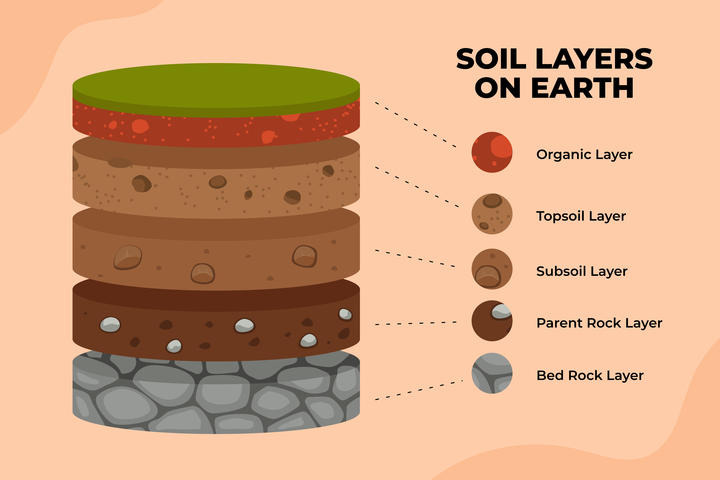
Alt Text: Diagram of Soil Layers on Earth, from top going down: organic layer, topsoil layer, subsoil layer, parent rock layer, and last bedrock layer.
Example 2

Alt Text: World Map of GDP per country in the Trillions. From most to least: US $20, China $13, Japan $5, Germany $4, India $2.80, UK $2.80, France $2.70, Brazil $2.10, Italy $2, and Canada $1.70.
Example 3

Alt Text: A word cloud with business terms, largest to smallest: Business, Success, Idea, Money, Creative, Presentation, and other smaller business terms.
Consider the Context
When writing alt text, consider the context of where and how the image is being used. The surrounding text of the document, website, or email may affect which parts of the image are most important to describe. In this example, the image of Hollis Hall in Harvard Yard is used in two different contexts, and requires different alt text for each use case.
Use Case 1
An article titled "Spring is Here!" that highlights students enjoying the nice weather and the Luxembourg chairs being returned to Harvard Yard.
Alt text: Students lounge and work in brightly colored Luxembourg chairs in Harvard Yard.

Use Case 2
An article titled "Famous residents of Hollis Hall" that touches on the prime location of Hollis Hall in relation to common spaces.
Alt text: Hollis Hall, a red brick building, sits directly adjacent to the open grassy space of Harvard Yard.
What About Image Captions?
Alt text is meant to convey the intent of the image as it relates to the content.
Captions are meant to provide additional information about an image and sometimes an image credit as well.
Consider including a visible caption below the image to add useful contextual information.
Caption Example 1
Alt Text: Diagram of Soil Layers on Earth, from top going down: organic layer, topsoil layer, subsoil layer, parent rock layer, and last bedrock layer.
Caption: The Earth's crust makes up less than 1% of the planet's total volume, with its outermost layers making up the soil.
Caption Example 2
Alt Text: A building facade with grand columns and hanging banners displaying Harvard shields.
Caption: For over ninety years, the Memorial Church of Harvard University has provided weekly services featuring the Harvard University Choir.
Additional Benefits
- Alt text is indexed by search engines, and can boost your site's online presence.
- Alt text will display if the image fails to load, such as in the following example of a missing image.
